Authentication
Every request is authenticated with an API key sent in the Authorization header:
Authorization: ApiKey pk_test_1a2b3c4d.<64 hexadecimal characters>Every SDK does this for you — pass the key once when you construct the client:
import { VectaPayClient } from "@vectapay/sdk";

const vectapay = new VectaPayClient({ apiKey: process.env.VECTAPAY_API_KEY! });
See SDK Installation for the equivalent in Python, Java, and C#, and for every other constructor option (timeout, retry policy, debug logging).
Test keys vs. live keys
A key’s environment is fixed when you create it, and every request made with that key inherits it. You cannot switch it per call.
| Prefix | Environment | What it can reach |
|---|---|---|
pk_test_ | Test | Your verified test phone (through our M-Pesa test line) and a Paystack test-key account, if you added one |
pk_live_ | Live | Your connected production payment methods, and real customers |
Test keys only ever reach your verified test phone — see Testing and Environments.
A key has two parts, joined by a dot: a public-looking keyId (pk_test_ or pk_live_ plus eight
hex characters) and a 64-character secret. Only the secret’s hash is stored — the full key is
shown once, at creation, and can never be retrieved again. If you lose it, rotate it to get a new key.
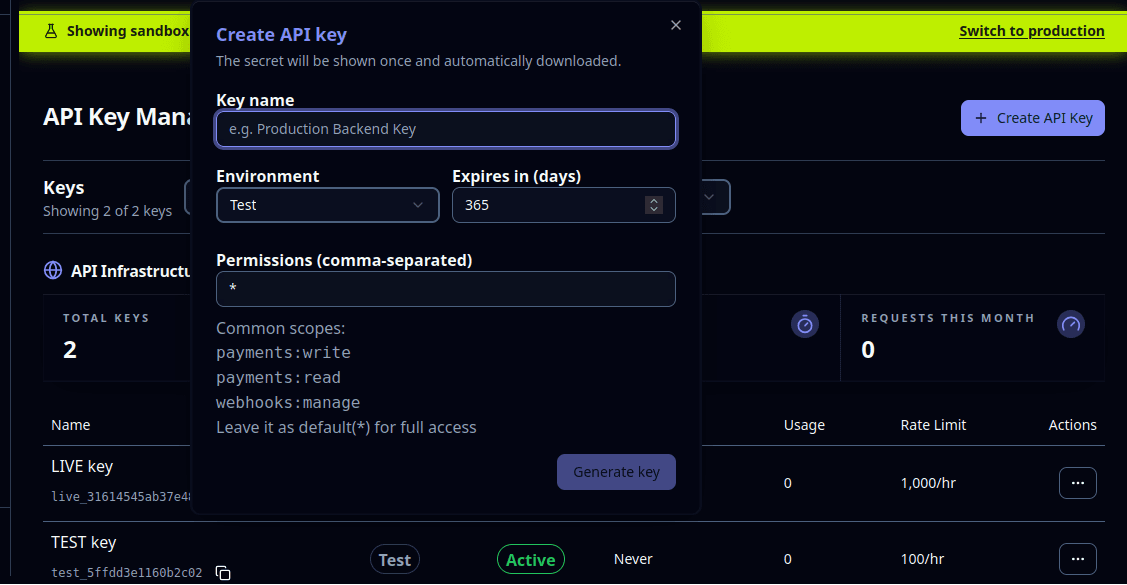
Create and manage keys from Developer → API Keys in the dashboard:
- Name — how you’ll recognise the key later (“Production server”, “Staging”).
- Environment — Test or Live. Choose deliberately; it cannot be changed after creation.
- Permissions —
*(everything) by default; restrict scopes when a key only needs part of the API. - Expiry — 365 days by default, configurable up to 10 years. An expired key returns
401like a revoked one.
Never expose an API key in frontend code. Every SDK call in this site’s examples assumes a server-side environment — a Next.js Route Handler, a backend service, a queue worker.
Permissions
A key carries the permission scopes it was created with, independent of the role of the person who
created it. The default is *; narrow it when a key should only, say, read payments. Calling a
route outside those scopes returns 401 with the missing scopes named.
Separately, live money movement is also gated by the business:
- Payouts require the payouts feature on your plan. Without it, payout routes return
403. - A test key is refused outright on live-only routes — payouts, refunds, payment retries,
batch operations — with
401 API key environment mismatch. Required: LIVE, Got: TEST.
Rate limits
Each key has an hourly request budget. Every response carries its current status:
X-RateLimit-Limit: 6000
X-RateLimit-Remaining: 5999
X-RateLimit-Reset: 1735689600
The window is one hour, sliding from your first request in it; the limit is per key and can be raised or lowered per key from the dashboard. The default is 6,000 requests per hour.
A 429 response includes a Retry-After header (seconds) and a JSON body with retryAfter and
resetTime. Every SDK already retries 429s and 5xxs with exponential backoff by default,
honoring that header — you only need to catch RateLimitError yourself if you’ve disabled retries
(maxRetries: 0 in the retry config). See Errors for the full error-handling
pattern in every language.
Test-mode prompts have their own, much smaller budgets, because each one rings a real handset — see Testing.
Keeping a key safe
- Store it in an environment variable or secret manager.
- Use a different key per environment (staging, production) so revoking one doesn’t break the other.
- Rotate on a schedule — create the replacement, deploy it, then revoke the old one from Developer → API Keys. Revocation takes effect immediately; the key’s last-used time is shown in the list so you can confirm nothing still depends on it.
- API key usage is logged per request and visible in the dashboard, which is what you inspect if a key is suspected leaked.