Quickstart
Send your first test payment in your safaricom sim card in about 5 minutes.
Verify your test phone
Open Developer → Testing and send the verification prompt to a Safaricom number you can reach right now. It’s a KES 10 prompt on our sandbox test mode; Safaricom credits the amount back a few minutes later. Enter your M-Pesa PIN and the completed payment marks the number verified. Test payments can only ever reach this phone.
Get a test API key
Sign up, then go to Developer → API Keys and create a key with the Test environment. Test keys only ever reach your verified phone — see Testing for what test mode does and doesn’t do.
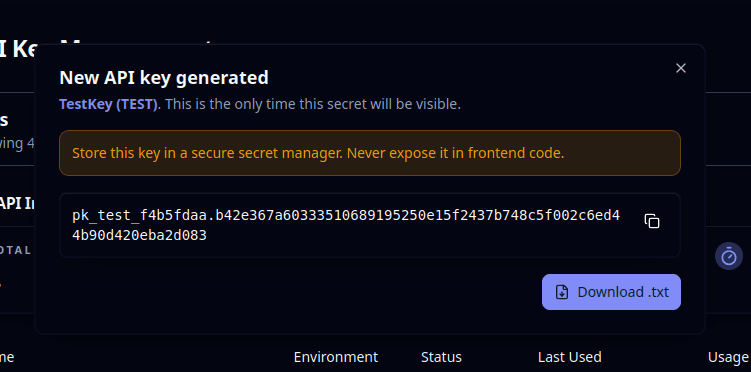
- Note: The key exposed here is already revoked, don’t try to use it.
- The Key is auto downloaded to a text file which you should store somewhere secure
Install the SDK
TypeScript
npm install @vectapay/sdkSend a payment request
Use the phone number you verified in step 1.
TypeScript
import { VectaPayClient, money } from "@vectapay/sdk";

const vectapay = new VectaPayClient({ apiKey: process.env.VECTAPAY_API_KEY! });

const payment = await vectapay.payments.collect({
  customer: { phone: "254712345678" },
  amount: money(50000), // KES 500.00 — money() takes minor units
  reference: "INV-001",
  description: "Payment for invoice INV-001",
});

console.log(payment.data.paymentId); // store this — you'll look the payment up with itA successful response means the prompt was sent to the customer’s phone — not that they’ve paid. In test mode the prompt arrives on your verified phone; enter your M-Pesa PIN and the payment settles in Safaricom’s sandbox. See Testing for the full smoke-test flow, including what happens when the prompt fails.
Confirm the payment
Don’t poll for the result. Set up a webhook endpoint once and every payment’s final status arrives there — see Webhooks for the full guide and a diagram of the whole flow. For a one-off check during development, Checking Status covers reading a payment back directly.
Next steps
- Collecting payments — the full request/response shape
- Webhooks — the reliable way to know when a payment completes
- Errors — every failure code and what to tell your customer